
This guide will show you how to Adjust Zombie Speed on your Project Zomboid Server
Click here to order your Project Zomboid server with Citadel today!
Adjusting zombie speed on your Project Zomboid server is an effective way to customize the difficulty, pacing, and overall intensity of your multiplayer survival experience. In Project Zomboid, zombies can pose very different levels of danger depending on how quickly they move and how players must respond to encounters. Whether you want to create a terrifying apocalypse filled with fast-moving undead, establish a more forgiving environment for new survivors, or provide a balanced challenge for experienced players, configuring zombie speed allows you to tailor the gameplay to your community's preferences. Project Zomboid provides zombie movement settings that let server owners customize how the undead behave when pursuing survivors. Depending on the available options for your game version, you can configure zombies to move slowly, walk at a normal pace, jog, or sprint. These movement behaviors significantly influence how players approach exploration, scavenging, combat, and base defense. Slower zombies generally give players more time to react, escape, and plan their next move, while faster zombies can make even routine activities dangerous by reducing the time available to respond to unexpected encounters. Choosing the right zombie speed is particularly important for multiplayer servers because players often have different levels of experience and preferred playstyles. A server configured with slower zombies may be ideal for casual cooperative gameplay, allowing players to focus on gathering supplies, developing skills, building bases, and exploring the world. Conversely, enabling faster zombies can create a more demanding survival environment in which players must carefully manage their stamina, select appropriate equipment, coordinate with teammates, and plan escape routes before entering dangerous areas. You can also use zombie speed settings alongside other sandbox options to create a customized difficulty that fits your server's intended atmosphere. When configuring zombie movement, it is important to understand that speed is only one part of the overall zombie behavior system. Other settings may influence their ability to detect survivors, follow sounds, navigate obstacles, and respond to nearby players. Combining these options allows you to create a more cohesive survival experience rather than relying solely on movement speed to increase or decrease difficulty. For example, slower zombies can still pose a significant threat when their population is high, while faster zombies can make a low-population world considerably more dangerous. Finding the right combination of settings can help you maintain an engaging balance between challenge and playability. In this guide, we'll walk you through how to adjust zombie speed on your Project Zomboid server using the relevant server configuration settings. You'll learn where to locate the appropriate options, how to choose the desired zombie movement behavior, and how to apply your changes so they take effect in-game. Whether you want to make zombies slower for a more relaxed experience, increase their speed for a more intense challenge, or configure different movement behaviors to suit your community, these steps will help you customize your server more effectively. Before making any changes, we recommend stopping your server and creating a backup of your existing configuration files. This helps protect your current settings and makes it easier to restore them if you encounter unexpected behavior. After modifying the appropriate options, save the configuration file and restart your server if required for the changes to take effect. You can then join the server and test zombie behavior to confirm that the selected movement settings match your expectations. By the end of this guide, you'll have a better understanding of how to configure zombie speed and customize the difficulty of your Project Zomboid server. With the right settings, you can create a survival experience that ranges from a slower-paced cooperative adventure to a relentless fight for survival against fast-moving zombies.
Changing Zombie Movement Settings
1. Log in to your Game Control Panel.
2. Before making any modifications, stop the server from running by clicking the Stop button.

3. Navigate to the File Manager section.
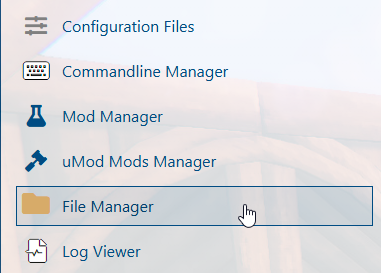
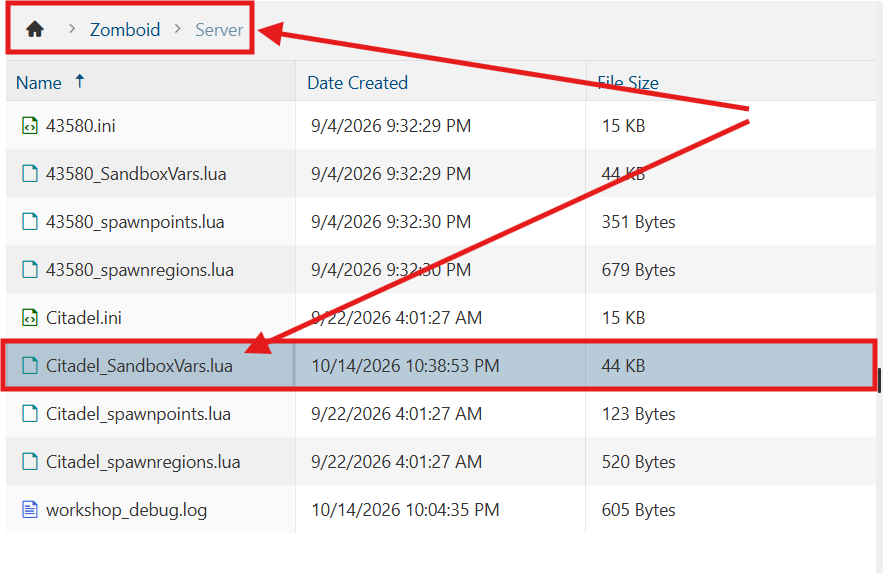
4. Navigate to the /Zomboid/Server directory and locate the [SaveName]_SandboxVars.lua file, replacing [SaveName] with the name of your server's save.
5. In the configuration file, locate the ZombieLore section and adjust the Speed value to your preferred setting to customize zombie movement speed on your server.

If Speed is set to Random, adjust the SprinterPercentage value to specify the percentage chance that a zombie will spawn as a sprinter.
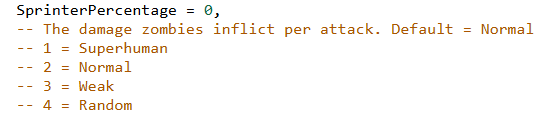
6. After editing, click Save to apply the changes.

You can now start playing on your server.
Did the above information not work for you?
Please click here to contact our support via a ticket.
