

This guide will show you how to change Livestock Settings on your Project Zomboid Server
Click here to order your Project Zomboid server with Citadel today!
Project Zomboid offers a variety of sandbox settings that allow server owners to customize the gameplay experience to suit their preferences and the needs of their community. Among these options are livestock settings, which influence how livestock is handled within your server's world. Adjusting these settings can help you create a more relaxed farming experience, establish a more challenging survival environment, or balance animal husbandry with the other survival mechanics in the game. Whether you're running a private server for friends or managing a dedicated multiplayer server, customizing the livestock configuration can help you tailor the overall farming experience. Depending on the available settings in your Project Zomboid version, you may be able to adjust aspects of livestock availability, behavior, or related gameplay mechanics to better suit your preferred playstyle. These options can be particularly useful for communities that focus on farming, resource management, and long-term survival.
In this guide, we'll walk you through how to access and modify the livestock settings on your Project Zomboid server, explain what the available options control, and help you choose settings that match your preferred gameplay experience. You'll also learn how to apply your changes so your server can provide a more convenient, challenging, or balanced animal husbandry experience for you and your players.
Whether you're looking to speed up animal growth, adjust breeding and resource production, or change how livestock interacts with the surrounding world, understanding these configuration options will help you make informed adjustments to your server.
Customizing Livestock Settings
1. Log in to your Game Control Panel.
2. Before making any modifications, stop the server from running by clicking the Stop button.

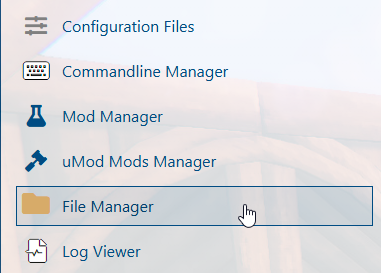
3. Navigate to the File Manager section.
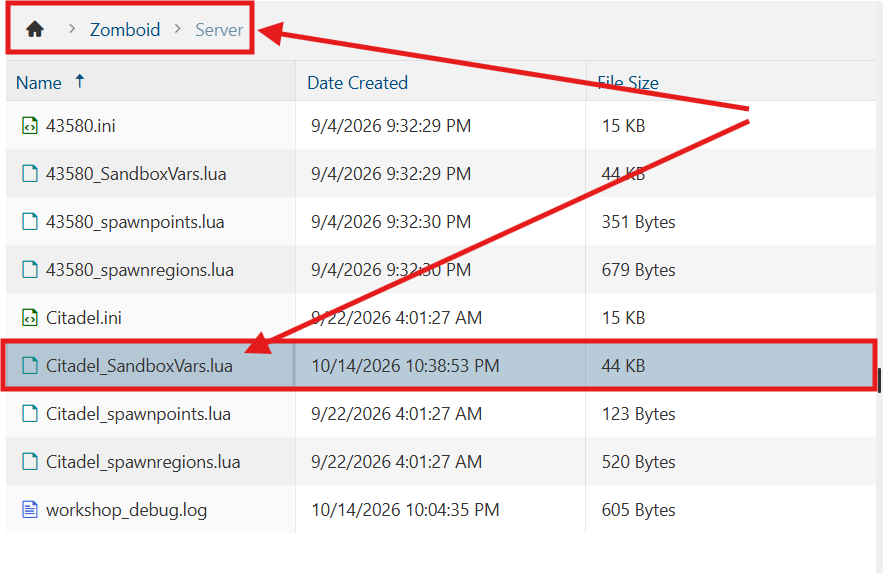
4. Navigate to the /Zomboid/Server directory and locate the [SaveName]_SandboxVars.lua file, replacing [SaveName] with the name of your server's save.
5. In the file, adjust the livestock settings according to your preferred gameplay experience.
| Setting | Value | Description |
|---|---|---|
| AnimalStatsModifier | 1 = Ultra Fast2 = Very Fast3 = Fast4 = Normal5 = Slow6 = Very Slow |
Speed at which animal stats (hunger, thirst, etc.) reduce. |
| AnimalMetaStatsModifier | Speed at which animal stats (hunger, thirst, etc.) reduce while in meta. | |
| AnimalPregnancyTime | How long animals are pregnant before giving birth. | |
| AnimalAgeModifier | Speed at which animals age. | |
| AnimalMilkIncModifier | Speed of milk production. | |
| AnimalWoolIncModifier | Speed of wool production. | |
| AnimalEggHatch | Sets how long it takes for baby animals to hatch from eggs. | |
| AnimalRanchChance | 1 = Never2 = Extremely Rare3 = Rare4 = Sometimes5 = Often6 = Very Often7 = Always |
The chance of finding animals on a farm. |
| AnimalGrassRegrowTime | 1 - 9999 |
The number of hours grass regrows after an animal eats it or the player cuts it. |
| AnimalMetaPredator | true | false |
Sets whether a meta fox may attack owned chickens when the hutch's door is left open at night. |
| AnimalMatingSeason | Sets whether animals breed only during their mating season. Otherwise, they reproduce year-round. | |
| AnimalSoundAttractZombies | Sets whether animal calls attract nearby zombies. | |
| AnimalTrackChance | 1 = Never2 = Extremely Rare3 = Rare4 = Sometimes5 = Often6 = Very Often |
The chance of animals leaving tracks. |
| AnimalPathChance | The chance of creating a path for animals to be hunted. |
6. After editing, click Save to apply the changes.

You can now start playing on your server.
Did the above information not work for you?
Please click here to contact our support via a ticket.
