

This guide will show you how to Change Farming Speed on your Project Zomboid Server
Click here to order your Project Zomboid server with Citadel today!
Farming is an important survival mechanic in Project Zomboid, allowing players to grow crops, produce a renewable food supply, and become less dependent on scavenging for supplies in the dangerous world of Knox Country. However, crops take time to grow, and the default farming progression may not suit every server's preferred gameplay style. Whether you want to create a more relaxed survival experience, encourage players to establish self-sufficient bases, or make food production more challenging, adjusting the farming speed can help you customize your server to better suit your community's needs. In this guide, we will walk you through how to change farming speed on your Project Zomboid server by accessing and modifying the relevant server configuration settings. Depending on your preferred gameplay experience and the available configuration options for your Project Zomboid version, you can adjust farming-related settings to influence how quickly crops develop and how players manage their agricultural activities. These changes can help you balance food availability, survival difficulty, and long-term progression on your server. Before making any changes, it is important to understand that farming speed and crop growth are not necessarily controlled by a single setting. Project Zomboid uses different mechanics for crop development, watering, disease, and other farming-related factors. The exact settings available may also vary depending on your game version, so you should verify the relevant configuration parameters before editing them. By following this guide, you will be able to locate your server's configuration files, identify the appropriate farming-related settings, and apply your preferred adjustments. Once the changes have been saved and applied, you and your players can enjoy a farming experience that better matches your server's intended pace, whether you prefer faster access to homegrown food or a slower, more demanding survival challenge.
Configuring Farm Speed
1. Log in to your Game Control Panel.
2. Before making any modifications, stop the server from running by clicking the Stop button.

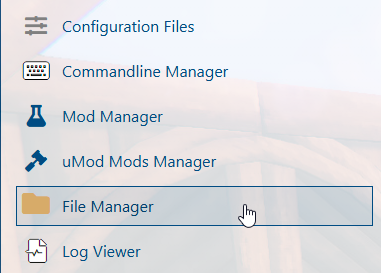
3. Navigate to the File Manager section.
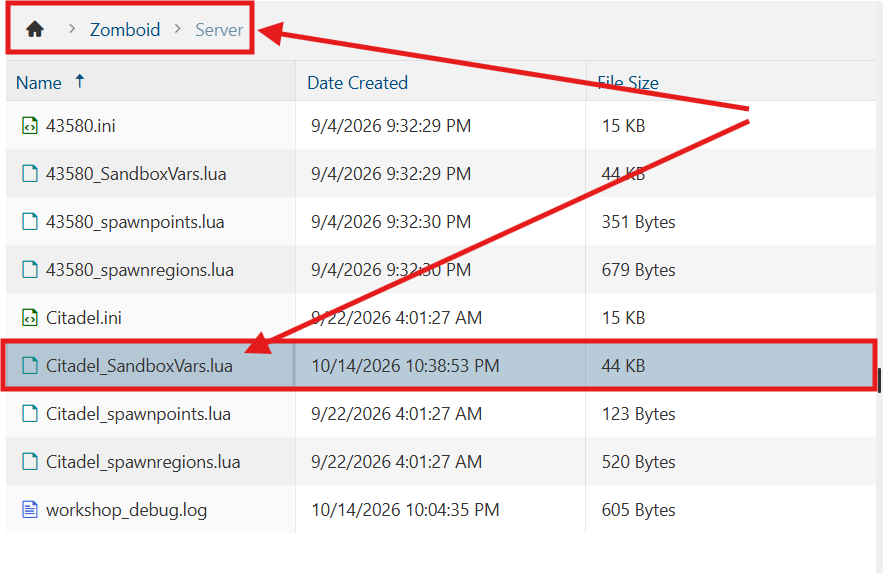
4. Navigate to the /Zomboid/Server directory and locate the [SaveName]_SandboxVars.lua file, replacing [SaveName] with the name of your server's save.
5. In the file, locate the farming growth speed setting and adjust its value to your preference. This determines how quickly crops grow on your server.
For example, setting the value to 2.0 would double the crop growth rate to 200% of the default speed.

6. After editing, click Save to apply the changes.

You can now start playing on your server.
Did the above information not work for you?
Please click here to contact our support via a ticket.
