

This guide will show you how to Set Player Starting Locations on your Project Zomboid Server
Click here to order your Project Zomboid server with Citadel today!
Setting player starting locations on your Project Zomboid server allows you to customize where players begin their survival journey when joining your multiplayer world. Whether you want everyone to start in a specific town, direct new players toward a designated safe zone, or encourage groups to establish their bases in different areas, configuring the appropriate spawn settings can help you create a more personalized multiplayer experience. Project Zomboid offers different ways to configure player spawn locations, depending on your preferred gameplay style and server setup. You can use the game's spawn configuration to specify available starting points, allowing players to choose from designated locations when creating their characters. This is particularly useful for roleplaying servers, community survival worlds, and multiplayer sessions where you want players to begin in a particular region of the map rather than relying on the default starting locations. Before making any changes, it is important to understand the difference between a fixed spawn point and a selectable spawn region. A fixed spawn point directs new characters to a specific set of map coordinates, while spawn regions allow players to select from the locations configured on your server. These settings can be managed through your server's configuration files, giving you greater control over how players enter your world. In this guide, we'll walk you through how to configure player starting locations on your Project Zomboid server, including how to customize spawn coordinates and manage the available starting regions. Before editing any configuration files, we recommend stopping your server and creating a backup of the relevant files to prevent accidental configuration issues. Once the changes are saved, restart your server and test the settings with a newly created character to confirm that the intended spawn location is applied.
Modifying the Spawn Location Settings
1. Log in to your Game Control Panel.
2. Before making any modifications, stop the server from running by clicking the Stop button.

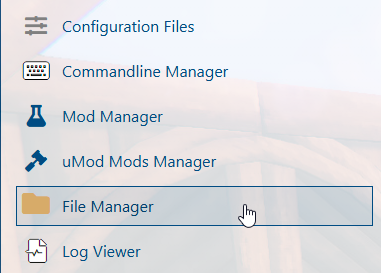
3. Navigate to the File Manager section.
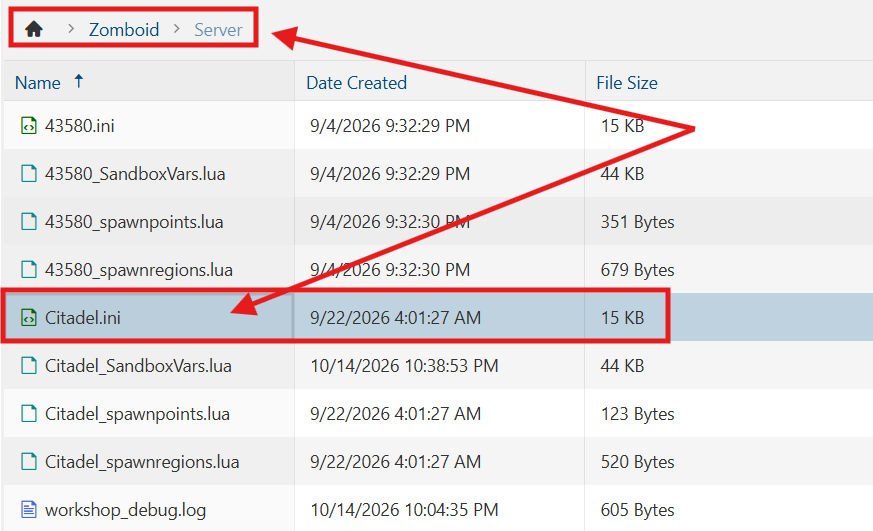
4. Navigate to the /Zomboid/Server directory and locate the [SaveName].ini file, replacing [SaveName] with the name of your server's save.
5. In the configuration file, locate the Spawnpoint= line and enter the desired coordinates to specify where players should spawn when joining the server.
Ensure that the coordinates correspond to a valid location on the Project Zomboid map to prevent players from spawning in inaccessible or unintended areas.
Once you have entered the coordinates, save the changes and restart your server for the updated spawn location settings to take effect.

6. After editing, click Save to apply the changes.

You can now start playing on your server.
Did the above information not work for you?
Please click here to contact our support via a ticket.
