

This guide will show you how to Configure Sleep Mechanics for your Project Zomboid Server
Click here to order your Project Zomboid server with Citadel today!
Sleep mechanics play an important role in shaping the survival experience in Project Zomboid, particularly on multiplayer servers where players must balance rest, fatigue, and other survival needs while coordinating with other survivors. As a server owner, configuring these settings allows you to customize how sleeping works in your world and determine whether players must sleep to manage fatigue or can continue surviving without mandatory rest. Whether you're hosting a cooperative survival server, a role-playing community, or a challenging multiplayer environment, adjusting the sleep mechanics can help create a gameplay experience that suits your players' preferences. Project Zomboid provides several sleep-related configuration options that influence how sleeping requirements and fatigue are handled during gameplay. Depending on your server's game version and configuration, you can adjust whether players experience fatigue, whether sleeping is required, and whether multiplayer players must sleep simultaneously to advance in-game time. These settings are particularly useful for servers where players follow different schedules, as requiring everyone to sleep at the same time can interrupt gameplay when some players are exploring, gathering supplies, or defending their base. Understanding the available sleep settings is essential for maintaining a balanced multiplayer experience. For example, a cooperative server may benefit from disabling mandatory sleep requirements to allow players to explore independently without interrupting others. Alternatively, a server focused on realism or role-playing may retain fatigue and sleeping requirements to encourage players to plan their activities, manage their rest, and prepare for nighttime dangers. By customizing these mechanics, you can establish rules that complement your server's difficulty, pacing, and overall survival objectives. In this guide, we'll walk you through how to access and configure the sleep-related settings on your Project Zomboid server, including options for sleep requirements, fatigue, and multiplayer sleeping behavior. Before making any changes, we recommend stopping your server and creating a backup of the relevant configuration files. Once you've updated and saved the settings, restart your server if necessary to apply the changes. You can then join the server and test the updated behavior to ensure that the sleep mechanics work as intended for your community.
Managing Sleep Options
1. Log in to your Game Control Panel.
2. Before making any modifications, stop the server from running by clicking the Stop button.

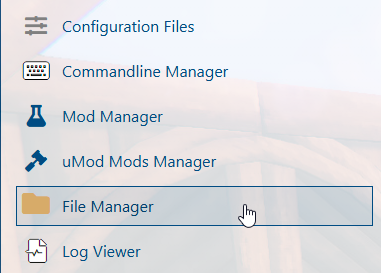
3. Navigate to the File Manager section.
4. Navigate to the /Zomboid/Server directory and locate the [SaveName].ini file, replacing [SaveName] with the name of your server's save.
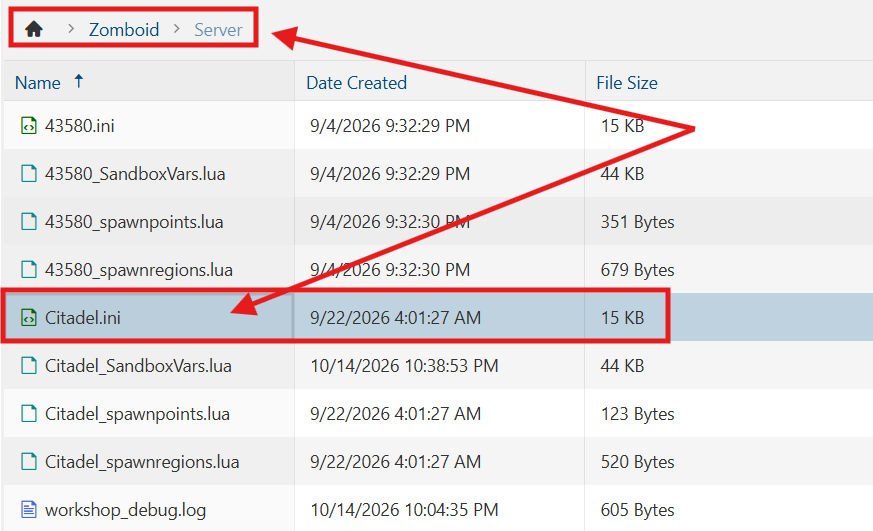
5. In the file, locate the SleepAllowed= line in the file and set its value to true to allow players to sleep. To require players to sleep, locate the SleepNeeded= line and set its value to true.

6. After editing, click Save to apply the changes.

You can now start playing on your server.
Did the above information not work for you?
Please click here to contact our support via a ticket.
