

This guide will help you enable a Hardcore Gameplay Experience on your Path of Titans Server
Click here to order your Path of Titans server with Citadel Servers today!
Customizing your Path of Titans server allows you to create a unique gameplay environment that caters to your community's preferences and provides the level of challenge you want players to experience. If you're looking to make survival more demanding and introduce greater consequences for player actions, enabling Hardcore Mode is an excellent way to create a more challenging gameplay experience. Hardcore gameplay is designed for players who enjoy a more unforgiving survival environment, where every decision carries greater importance, and mistakes can have lasting consequences. By enabling this mode on your server, you can offer players a different approach to survival that encourages careful planning, strategic decision-making, and greater awareness of their surroundings. This can be particularly appealing to communities that enjoy realistic survival mechanics, competitive gameplay, or additional challenges beyond the standard game experience. Whether you're establishing a dedicated hardcore survival community, organizing challenging gameplay events, or simply looking to make your server more demanding, configuring Hardcore Mode can help you create an experience that stands apart from standard Path of Titans gameplay. It also provides an opportunity to attract players who prefer higher-risk environments and enjoy testing their survival skills. In this guide, we'll walk you through how to enable a hardcore gameplay experience on your Path of Titans server by modifying the appropriate configuration settings. We'll explain where to locate the relevant parameter and how to adjust its value so your server can apply the desired Hardcore Mode settings. By following these instructions, you'll be able to customize your server and provide your players with a more challenging and immersive survival experience.
(Please note: Permadeath is an experimental feature and may cause issues with character saves, including potential save corruption or data loss. We recommend using this feature with caution.)
Turning On Hardcore Mode for Your Path of Titans Server
1. Log in to your Game Control Panel.
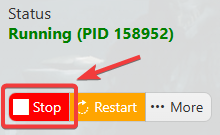
2. Before making any modifications, stop the server from running by clicking the Stop button.
3. Navigate to Configuration Files.
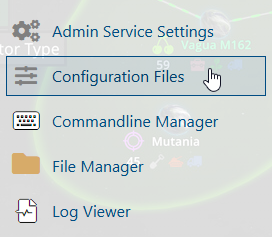
4. In the Configuration Files section, locate the Game.ini file and click Text Editor to open and edit the file.

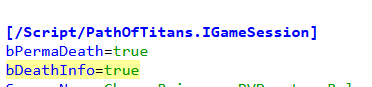
5. In the configuration file, locate the Hardcore Mode parameters listed below.
Set the corresponding parameters to True to enable Hardcore Mode and provide players with a more challenging gameplay experience on your server.
(Note: If these parameters are not present in the configuration file, you can manually add them under the [/Script/PathOfTitans.IGameMode] section.)
6. After editing, click the Save button to apply the changes.

