
This guide will help you learn how to Turn Off Fall Damage on your Path of Titans Server
Click here to order your Path of Titans server with Citadel Servers today!
Fall damage is an important gameplay mechanic in Path of Titans, affecting how dinosaurs take damage when falling from elevated locations, cliffs, steep terrain, or other significant heights. While this mechanic adds an additional layer of survival difficulty and encourages players to navigate the environment carefully, it may not be suitable for every server community. Depending on your preferred gameplay style, you may want to disable fall damage to create a more relaxed experience, reduce unnecessary injuries, or allow players to explore the map without worrying about taking damage from accidental falls. Customizing fall damage settings gives server owners greater flexibility in shaping their community's gameplay experience. For example, casual or exploration-focused servers may benefit from disabling fall damage so players can travel across challenging terrain more freely. Similarly, roleplay and community servers may prefer to remove this mechanic to make gameplay more accessible and reduce interruptions caused by accidental falls. This can also be useful for servers that prioritize player freedom and exploration over traditional survival challenges. By modifying the appropriate server configuration settings, you can control how fall damage affects dinosaurs and tailor this gameplay mechanic to your community's preferences. Whether you want to eliminate fall damage entirely or simply adjust the experience to better suit your server's rules, understanding these configuration options will help you achieve your desired results. In this guide, we'll walk you through how to access your Path of Titans server configuration files and disable fall damage. We'll also explain which settings to modify and how to apply the changes so your server provides the gameplay experience you want for your players.
Disabling Fall Damage on Your Path of Titans Server
1. Log in to your Game Control Panel.
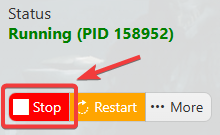
2. Before making any modifications, stop the server from running by clicking the Stop button.
3. Navigate to Configuration Files.
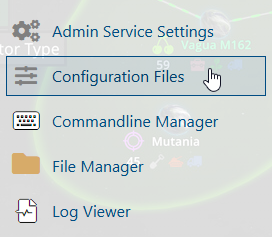
4. In the Configuration Files section, locate the Game.ini file and click Text Editor to open and edit the file.

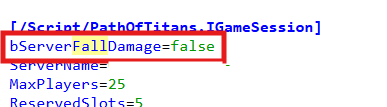
5. In the configuration file, locate the bServerFallDamage parameter and set its value to false to disable fall damage on your server.
This will prevent dinosaurs from taking damage due to falls, providing a more relaxed gameplay experience for your players.
(Note: If these parameters are not present in the configuration file, you can manually add ServerDayLength and ServerNightLength under the [/Script/PathOfTitans.IGameMode] section.)
6. After editing, click the Save button to apply the changes.

