

This guide will help you How to Secure Your DeadPoly Server From Unwanted Players
Click here to order your DeadPoly server from Citadel today!
Keeping your DeadPoly server secure is essential for maintaining a private, controlled, and enjoyable multiplayer experience. Whether you are hosting a server exclusively for friends, organizing a private community, or managing a dedicated server for a select group of players, you may want to prevent strangers or unauthorized users from joining. Without the appropriate access restrictions, your server may be accessible to players outside your intended group, potentially disrupting gameplay, interfering with other players, or affecting the overall experience on your server. Fortunately, there are ways to manage access to your DeadPoly server and reduce the likelihood of unwanted players joining. Depending on the available server configuration options, you may be able to adjust the server's privacy settings, configure a server password, or use other supported access control features. These measures can help you maintain greater control over who can connect to your server and ensure that your multiplayer sessions remain limited to your intended audience. It is also important to understand the difference between making a server private and granting administrative privileges, as these serve different purposes when managing your server. In this guide, we will walk you through the steps to secure your DeadPoly server from unwanted players by reviewing the relevant configuration settings and identifying the available options for restricting access. We will also cover important considerations when applying changes to your server to help ensure that your intended players can still connect successfully. By following these steps, you can better manage your server's accessibility, reduce unwanted connections, and create a more controlled environment for your DeadPoly community.
Improving Privacy and Access Control
1. Log in to your Game Control Panel.
2. Before making any modifications, stop the server from running by clicking the Stop button.

3. Navigate to the Configuration Files section.

4. In Configuration Files, look for the Game.ini file and click the Text Editor beside the Config Editor.

5. In the Text Editor, locate the Allowed, Admins & Banned section in the configuration file, then find an allow= entry and replace its numeric value with your player ID.
You can find your player ID in the in-game Trust Menu.
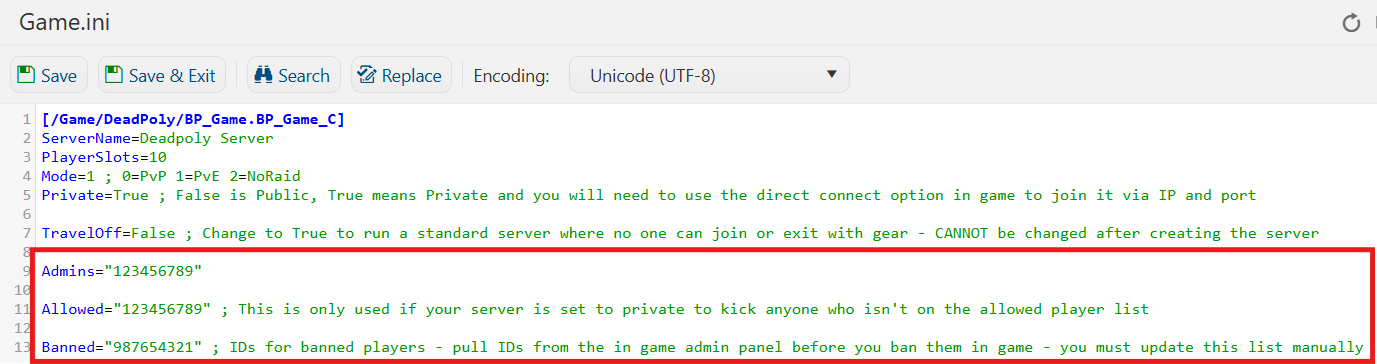
6. After editing, click Save to apply the changes.

You can now start playing on your server.
Did the above information not work for you?
Please click here to contact our support via a ticket.
