

This guide will help you How to Configure and Manage Admins on your DeadPoly Server
Click here to order your DeadPoly server from Citadel today!
Managing a DeadPoly dedicated server becomes much easier when you have trusted administrators who can help oversee gameplay, enforce server rules, and maintain a fair and enjoyable environment for everyone. Whether you are hosting a private server for friends or running a public community with multiple players, configuring administrator permissions is an important step toward keeping your server organized and well-managed. In DeadPoly, administrators can use designated permissions or administrative commands to help manage different aspects of the server, depending on the game's supported administration features. Assigning admin access to trusted players allows you to share server management responsibilities without needing to handle every task yourself. This can be particularly useful for monitoring player activity, addressing disruptive behavior, and helping resolve issues that arise while you are away. In this guide, we will walk you through the process of configuring and managing administrators on your DeadPoly server. You will learn how to identify the appropriate configuration settings or administrative tools, grant admin access to selected players, and verify that the assigned permissions work as expected. We will also cover important considerations for managing administrator access and troubleshooting common issues that may prevent a player from receiving the expected permissions. Before making any changes, ensure that you have access to your server's control panel and configuration files, if required by your server setup. It is also recommended to stop your server before editing configuration files to help prevent changes from being overwritten. Once your changes have been saved, restart the server if necessary and test the assigned permissions in-game. Important: Only grant administrator access to players you trust. Depending on the permissions available in DeadPoly, administrative access may allow a player to perform actions that affect other players or the server environment. Reviewing the available permissions and limiting access to trusted individuals can help protect your server and maintain a positive multiplayer experience. By following this guide, you can establish a more manageable server administration setup and ensure that the right people have the access they need to help maintain your DeadPoly community.
Managing Server Administrators
1. Log in to your Game Control Panel.
2. Before making any modifications, stop the server from running by clicking the Stop button.

3. Navigate to the Configuration Files section.

4. In Configuration Files, look for the Game.ini file and click the Text Editor beside the Config Editor.

5. In the Text Editor, locate the admin settings and enter the SteamID64 of the player you want to grant administrator permissions to.
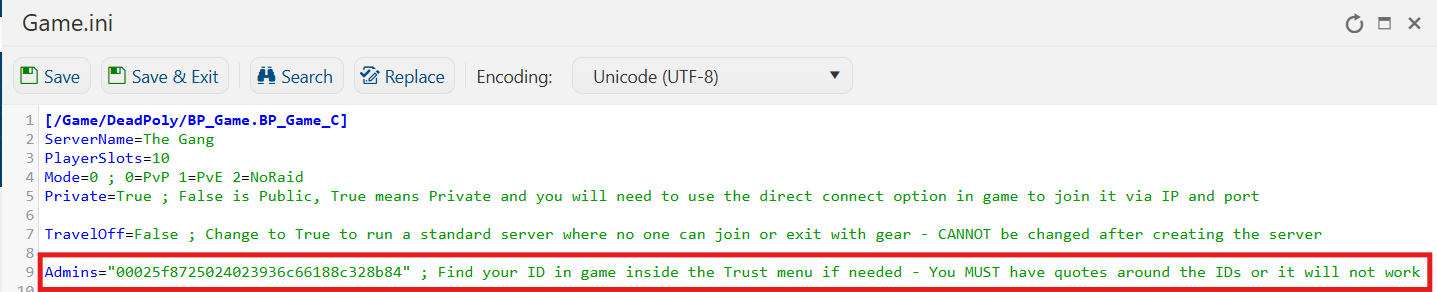
6. After editing, click Save to apply the changes.

You can now start playing on your server.
Did the above information not work for you?
Please click here to contact our support via a ticket.
