

This guide will show you how to adjust the Number of Buildings Players Can Place on your Palworld Server
Not a client yet? Order a Palworld Server today with Citadel Servers
Building is one of the core gameplay features in Palworld, allowing players to construct bases, storage areas, production facilities, defensive structures, and other structures throughout their adventures. However, the number of structures a player can place may be restricted by the server's maximum buildings per player setting. Depending on your server's gameplay style, the default building limit may be too restrictive for players who want to create large or highly detailed bases. Adjusting the building limit gives server owners greater control over how much players can construct. Increasing the limit can provide players with more freedom to expand their bases, create larger facilities, or build more elaborate structures. On the other hand, lowering the limit can help encourage more efficient construction and may be useful for servers where limiting the number of structures is part of the intended gameplay experience. This setting can be particularly useful for communities with different building preferences. A casual or creative-focused server may benefit from a higher limit that gives players greater freedom to design their bases, while a more survival-focused server may use a lower limit to encourage resource management and more strategic construction. In this guide, we'll walk you through how to adjust the number of buildings players can place on your Palworld server by modifying the appropriate server configuration setting. You'll learn where to locate the relevant option, how to change its value, and how the setting affects the number of structures each player is allowed to construct. Before making any changes to your server configuration, we recommend creating a backup of your configuration files. This gives you a restore point if an incorrect value is entered or if you later decide to return to your previous settings. After saving the changes, restart your Palworld server so the updated building limit can be loaded and applied to your gameplay environment
Increasing the Maximum Number of Buildings per Player
1. Log in to your Game Control Panel.
2. Before making any modifications, stop the server from running by clicking the Stop button.

3. Navigate to the Configuration Files section.

4. In Configuration Files, look for the Pal\Saved\Config\WindowsServer\PalWorldSettings.ini file and click the Text Editor beside the Config Editor.

5. In the Text Editor, locate the Max Buildings per Player setting and enter your desired maximum value. This setting determines the maximum number of buildings each player can place on the server.
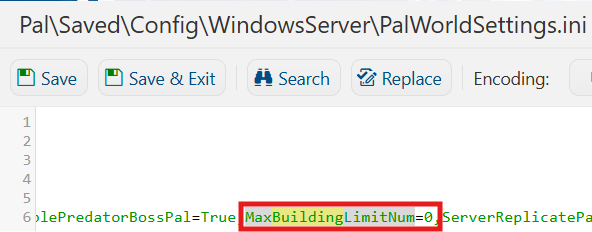
6. After editing, click Save to apply the changes.

You can now start playing on your server.
Did the above information not work for you?
Please click here to contact our support via a ticket.
