

This guide will show you how to Configure Death Penalty Settings in your Palworld Server
Not a client yet? Order a Palworld Server today with Citadel Servers
When playing on a Palworld server, the death penalty determines what happens to a player’s items and equipment when they die. Depending on your server’s settings, players may drop some or all of their inventory, lose their equipment, or keep everything they were carrying after respawning. Configuring this setting allows you to tailor the server’s survival experience to match your preferred playstyle. Whether you want to create a challenging survival experience, reduce the consequences of death for casual players, or completely disable item loss, Palworld provides a setting that can be adjusted to suit your server. This can be particularly useful for community servers where you want to balance difficulty and accessibility for different types of players. In this guide, we'll walk you through how to configure the Death Penalty settings on your Palworld server, including where to find the setting, what the available options do, and how to apply the changes correctly.
Changing Death Penalty Settings
1. Log in to your Game Control Panel.
2. Before making any modifications, stop the server from running by clicking the Stop button.

3. Navigate to the Configuration Files section.

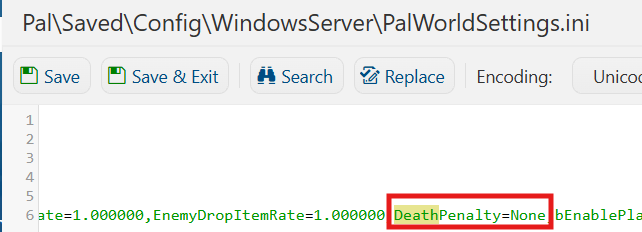
4. In Configuration Files, look for the Pal\Saved\Config\WindowsServer\PalWorldSettings.ini file and click the Text Editor beside the Config Editor.

5. In the Text Editor, locate the Death Penalty dropdown menu and select the desired setting based on your preferred server gameplay experience.
| Setting | Description |
|---|---|
No Penalty |
Players will not lose anything when dying. |
Lose Items |
Players drop all items in their inventory, excluding equipped items. |
Lose Items + Equipment |
Players drop all items and equipped gear. |
Lose full Inventory |
Players drop all items, equipped gear, and their pals. |
Edit the desired Death Penalty settings to customize the consequences of player death. Please note that some settings are only available for PvP servers.
| Setting | Description |
|---|---|
| Drop Extra Items on Death | Sets whether players will drop extra items when killed in PvP. |
| Extra Items Dropped on Death | Sets the number of extra items dropped when the above is enabled. |
| Lose Pal on Death | If enabled, Pals will be lost when they die. |
| Allow Guild Death Penalty Pickup | If enabled, other guilds can access Death penalty drops. |
6. After editing, click Save to apply the changes.

You can now start playing on your server.
Did the above information not work for you?
Please click here to contact our support via a ticket.
