
This guide will help you How to Customize Event Settings on your ACC Server
Your Race Starts Here: Get Your ACC Server from Citadel Servers Today
Customizing the event settings on your Assetto Corsa Competizione (ACC) server allows you to create a racing experience tailored to your community, league, or individual preferences. By adjusting the event configuration, you can control how each session is structured and define important aspects of the race, including practice and qualifying sessions, race duration, weather conditions, time progression, penalties, driver assists, and other gameplay parameters. ACC provides a wide range of configuration options, making it possible to create anything from a simple practice session for a group of friends to a fully structured, competitive race event. Taking the time to configure these settings correctly can help ensure that every event runs as intended and provides a consistent experience for all participants. The event configuration is typically managed through the server's configuration files, where individual parameters determine how the event is presented and conducted. Understanding these settings is important because changes to one option can affect the overall flow of a race. For example, adjusting session durations changes the event schedule, while weather and time settings can significantly influence track conditions and driving strategy. In this guide, we will walk you through the key event settings available on an ACC server and explain how to customize them according to your requirements. We will cover the most important options, including practice, qualifying, and race sessions, session durations, time multipliers, weather conditions, dynamic weather, track conditions, penalties, driver assists, and other event-related settings. Whether you are organizing casual multiplayer races, managing a dedicated racing league, or hosting special events for a larger ACC community, properly configured event settings can help create a more organized, predictable, and enjoyable racing environment. By the end of this guide, you will have a clear understanding of how ACC event settings work and how to adjust them to create events that match your preferred racing format. You will also be able to modify your configuration for different race formats and requirements as your server evolves.
Configuring the Event Settings on Your Assetto Corsa Competizione Server
1. Log in to your Game Control Panel and navigate to your service.
2. Before making any changes, ensure that your server is fully stopped.
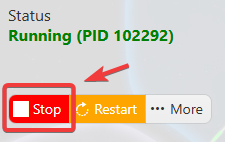
This helps prevent configuration changes from being overwritten or reverted to their default values.
3. Navigate to the Configuration Files tab to access your server’s configuration settings.
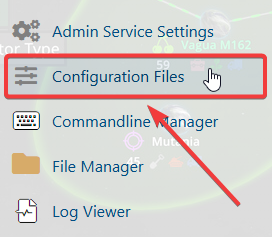
4. In the Configuration Files section, locate the event.json file, then click Text Editor to open and modify the event settings.

5. Configure the event settings to create a racing experience that best matches your preferences and provides the level of realism, challenge, and enjoyment you desire.
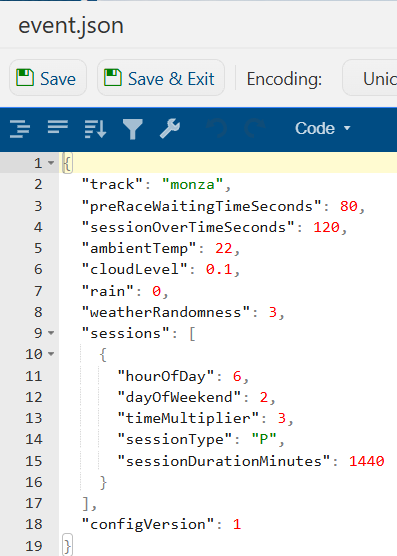
6. Once you have finished editing the settings, click the Save button to apply the changes to your server.