

This guide will show you how to Add Players to the Blacklist on your Colony Survival Server
Click here to order your Colony Survival server with Citadel Servers today!
Managing player access is an important part of maintaining a safe, enjoyable, and well-organized multiplayer environment on your Colony Survival server. While most players contribute positively to a community, there may be situations where certain individuals disrupt gameplay, violate server rules, or engage in unwanted behavior. In these cases, having the ability to restrict specific players from accessing your server can help maintain a fair and welcoming experience for everyone else. Colony Survival provides a blacklist feature that allows server owners and administrators to prevent specific players from joining their server. By adding a player's information to the blacklist, you can restrict their access without needing to modify other server settings or interfere with the progress of existing players. This is particularly useful for private communities, public servers, and multiplayer environments where administrators need greater control over who can participate. Configuring a player blacklist also makes server moderation easier by providing a centralized way to manage restricted players. Whether you're addressing repeated rule violations, preventing unwanted visitors, or maintaining a controlled multiplayer environment, this feature gives you greater flexibility when managing your server's player access. In this guide, we'll walk you through how to add players to the blacklist on your Colony Survival server by locating and editing the appropriate configuration file. We'll also cover how to apply the changes so that the specified players are prevented from joining your server.
Setting Up a Blacklist on Your Colony Survival Server
1. Log in to your Game Control Panel.
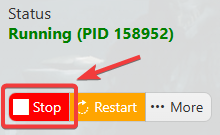
2. Before making any modifications, stop the server from running by clicking the Stop button.
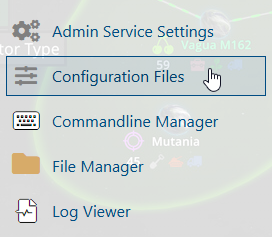
3. Navigate to Configuration Files.
4. In the Configuration Files section, locate the blacklist.txt file and click Text Editor to open and edit the file.

5. Add the player's SteamID64 to a new line in the file. For instructions on how to find a player's SteamID64, refer to this guide.
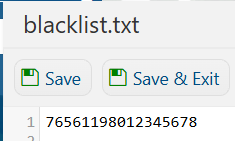
6. After editing, click the Save button to apply the changes.

