
This guide will show you how to Turn Off Auto-Pause on your Colony Survival Server
Click here to order your Colony Survival server with Citadel Servers today!
Colony Survival servers include an automatic pause feature that temporarily suspends server activity when no players are connected. This feature helps reduce unnecessary resource usage while the server is empty, making it useful for communities that do not require their worlds to remain active around the clock. However, for server owners who prefer a persistent multiplayer experience, automatic pausing can interrupt gameplay and prevent certain in-game activities from progressing while nobody is online. Disabling Auto-Pause allows your Colony Survival server to remain active even when all players have disconnected. This can be particularly useful for communities that want their colonies to continue developing between play sessions, maintain a more consistent multiplayer environment, or allow players to reconnect without waiting for the server to resume its activity. Keeping the server running also helps ensure that scheduled in-game activities and other server processes can continue without being interrupted by an empty player count. In this guide, we'll walk you through how to turn off Auto-Pause on your Colony Survival server using the server configuration settings. We'll also explain how to apply the changes so your server can remain active regardless of whether players are currently connected.
Disabling the Automatic Pause Feature on Your Colony Survival Server
1. Log in to your Game Control Panel.
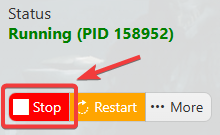
2. Before making any modifications, stop the server from running by clicking the Stop button.
3. Navigate to Configuration Files.
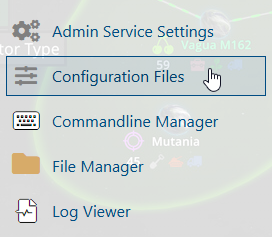
4. In the Configuration Files section, locate the server.json file and click Text Editor to open and edit the file.

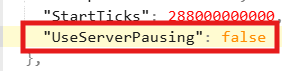
5. Under the Time settings, locate the UseServerPausing parameter and change its value to False to disable automatic server pausing.
6. After editing, click the Save button to apply the changes.

