

This guide will show you how to Configure Automatic Save Intervals on your Astroneer Server
Click here to order your Astroneer server with Citadel Servers today!
Properly configuring your Astroneer dedicated server is essential to protect your world progress and ensure a smooth multiplayer experience. As players explore new planets, gather resources, construct elaborate bases, and complete various objectives, their progress continuously changes the state of the server world. Without regular saves, unexpected server crashes, interruptions, or restarts could result in the loss of recent progress. This is why configuring an appropriate automatic save interval is an important part of maintaining your server. Astroneer includes an autosave feature that periodically saves your server's world data without requiring administrators or players to manually save their progress. By adjusting the autosave interval, you can control how frequently the server creates automatic saves. Setting a shorter interval can help minimize potential progress loss if an unexpected interruption occurs, while a longer interval may reduce how frequently the server performs save operations. Finding the right autosave frequency depends on your server's activity, the number of players, and your preferred balance between save frequency and server performance. For example, servers with frequent player activity and ongoing building projects may benefit from more frequent saves, whereas smaller private servers with less activity may be comfortable using longer intervals. Choosing a suitable setting helps ensure that your world progress is preserved regularly without introducing unnecessary interruptions to your multiplayer sessions. In this guide, we will walk you through the process of configuring automatic save intervals on your Astroneer server. We will explain where to locate the relevant server configuration setting and how to adjust its value to match your preferred save frequency. By following these steps, you can customize how often your server automatically saves its world data, helping protect player progress and maintain a more reliable multiplayer environment.
Changing the Autosave Interval on Your Astroneer Server
1. Log in to your Game Control Panel.
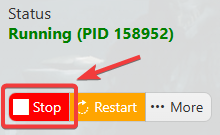
2. Before making any modifications, stop the server from running by clicking the Stop button.
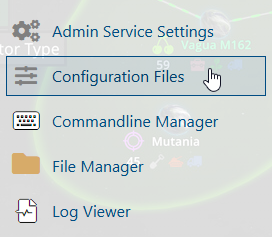
3. Navigate to Configuration Files.
4. In the Configuration Files section, locate the AstroServerSettings.ini file and click Text Editor to open and edit the file.

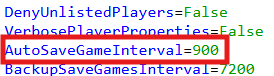
5. In the configuration file, locate the AutoSaveGameInterval parameter and adjust its value to specify how frequently you want your server to automatically save the game world.
6. After editing, click the Save button to apply the changes.

