This guide will show you how to Set Rating Requirements on your MX Bikes Server
Click here to order your MX Bikes server with Citadel Servers today!
Setting rating requirements on your MX Bikes server allows you to control which players can join based on their current rating. This can be useful for creating servers intended for players within a specific skill range, organizing competitive events, or preventing players with ratings outside your preferred range from joining. By configuring the appropriate rating restrictions, you can tailor your server's accessibility to better suit your community and the type of racing experience you want to provide. This guide will walk you through how to locate and configure the relevant rating settings on your MX Bikes dedicated server, including how to define the minimum and maximum rating requirements for players joining your server.
Configuring Rating Requirements in MX Bikes
1. Log in to your Game Control Panel.
2. Before making any modifications, stop the server from running by clicking the Stop button.

3. Navigate to the Configuration Files section.

4. In Configuration Files, look for the Settings.ini file and click the Text Editor beside the Config Editor.

5. In the Text Editor, locate the [rating] parameter and configure it according to your preferred rating requirements.
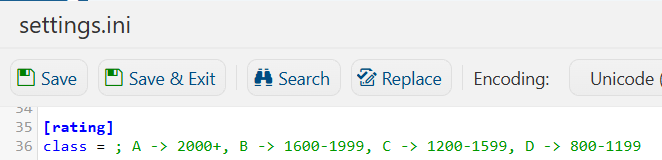
6. Once you have finished editing the settings, click the Save button to apply the changes to your server.