This guide will show you how to adjust the Player Limit on your MX Bikes Dedicated Server
Click here to order your MS Bikes server with Citadel Servers today!
In MX Bikes, adjusting the player limit allows you to control how many players can join your dedicated server simultaneously. Whether you want to host a small session with friends or accommodate a larger group of riders, configuring the player limit helps you tailor your multiplayer experience to your preferences. In this guide, we will walk you through the process of changing the maximum number of players allowed on your MX Bikes Dedicated Server. You will learn how to access the relevant server configuration settings and adjust the player limit to suit your needs. Follow the instructions below to configure your server and ensure it is ready to accommodate your desired number of players.
Configuring Maximum Player Slots
1. Log in to your Game Control Panel.
2. Before making any modifications, stop the server from running by clicking the Stop button.

3. Navigate to the Configuration Files section.

4. In Configuration Files, look for the Settings.ini file and click the Text Editor beside the Config Editor.

5. In the Text Editor, locate the Max Client setting and enter the desired maximum number of clients allowed to connect to your server.
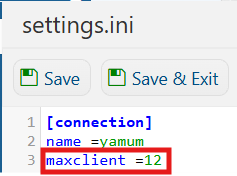
(Note: Keep in mind that the maximum number of players is limited by the player capacity included with your purchased service. Any value set above your plan’s player limit will not be applied to your server.)
6. Once you have finished editing the settings, click the Save button to apply the changes to your server.