

This guide will show you how to Modify Gathering Rates in the Soulmask Server
Looking to rent a Soulmask server? Click here to order your server now!
Customizing the gathering rate on your Soulmask server is one of the fastest ways to shape how players progress through the game. Whether you want a more challenging survival experience with slower resource gain or a faster, more relaxed playthrough with boosted yields, Soulmask gives server hosts full control over how quickly materials are collected. By adjusting the resource yield settings, you can fine‑tune the pace of crafting, building, and exploration to match your server’s goals. This guide walks you through how to modify these values so you can create a gameplay experience that feels balanced, rewarding, and tailored to your community.
Customizing Resource Gathering on Your Soulmask Server
1. Connect to your Soulmask server

2. Log in as an admin. Learn how to do this here.

3. Open the Coefficient Settings menu.

4. Head to the Output & Drops tab to continue.
5. Set the Output Multipliers to your desired levels. You can find descriptions of each setting in the following section.
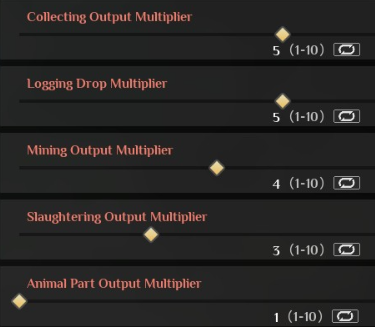
| Name | Description | Default | Difficulty Defaults |
|---|---|---|---|
| Collecting Output Multiplier | Multiplies resources gained per hit when collecting with hands or a scythe. | 1 |
Casual - 3Easy - 2Normal - 1Hard - 1Master - 1 |
| Logging Drop Multiplier | Multiplies resources gained per hit when logging. | 1 |
Casual - 3Easy - 2Normal - 1Hard - 1Master - 1 |
| Mining Output Multiplier | Multiplies resources gained per hit when mining. | 1 |
Casual - 3Easy - 2Normal - 1Hard - 1Master - 1 |
| Slaughtering Output Multiplier | Multiplies resources gained when harvesting an animal. | 1 |
Casual - 3Easy - 2Normal - 1Hard - 1Master - 1 |
| Animal Part Output Multiplier | Multiplies special resources gained when harvesting an animal. | 1 |
Casual - 3Easy - 2Normal - 1Hard - 1Master - 1 |
| Automated Production Base's Output Multiplier | Automated Production Base's Output Multiplier. | 1 |
Casual - 3Easy - 2Normal - 1Hard - 0.8Master - 0.6 |
| Normal Barbarian Drop Multiplier | Multiplier applied to items dropped by normal wild humans when killed. Does not affect the gear. | 1 |
Casual - 3Easy - 2Normal - 1Hard - 1Master - 1 |
| Elite Barbarian Drop Multiplier | Multiplier applied to items dropped by elite wild humans when killed. Does not affect the gear. | 1 |
Casual - 3Easy - 2Normal - 1Hard - 1Master - 1 |
| Boss Drop Multiplier | Multiplier applied to items dropped by bosses when killed. Does not affect the gear. | 1 |
Casual - 3Easy - 2Normal - 1Hard - 1Master - 1 |
| Plant Crop Yield Multiplier | Multiplies the amount gained when harvesting crops. | 1 |
Casual - 3Easy - 2Normal - 1Hard - 0.8Master - 0.6 |
| Chest Drop Multiplier | Multiplies the amount of items found in loot chests. | 1 |
Casual - 3Easy - 2Normal - 1Hard - 1Master - 1 |
| Animal Yield Multiplier | Multiplies the amount of resources obtained from slaughtering tamed animals. | 1 |
Casual - 3Easy - 2Normal - 1Hard - 0.8Master - 0.6 |
Please click here to contact our support via a ticket.
