

This guide will show you how to connect to your RuneScape: Dragonwilds server using the in-game server browser.
Click here to order your Runescape DragonWilds server with Citadel Servers today!
Important
Setting the Owner ID is required in order to join your server. Please refer to our guide on how to set your Owner ID on your RuneScape: Dragonwilds server.
Setting the Owner ID is required in order to join your server. Please refer to our guide on how to set your Owner ID on your RuneScape: Dragonwilds server.
Step 1: Configure your World Name
To make your server visible in-game, you will need to set your Server Name
1. Log in to your Citadel Servers Game Panel and stop your server.
2. Navigate to the Configuration tab and click the config editor.

3. Locate the Server Name and enter your desired Server Name
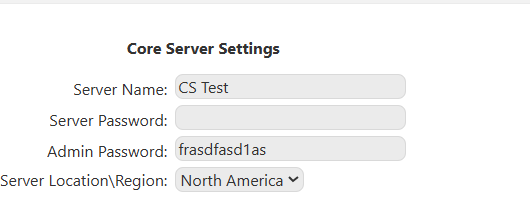
Save your changes and start your server
Step 2: Join your Server
Step 2: Join your Server
1. Launch RuneScape: Dragonwilds
Click Play
2. Go to the Public tab
3. Search for your server using the World Name
4. Select your server and click Enter World
Did the above information not work for you?
Please click here to contact our support via a ticket.
Please click here to contact our support via a ticket.
