
This guide will show you how to Ban Players from your Terraria server.
This should apply to the base Vanilla Game, Tmodloader, and Tshock.
Click here to order your Terraria server with Citadel Servers today!
1. Log in to your Game Control Panel.
2. Open the Web Console tab to use Console Commands.
Use the "ban <username>" command to ban the player.
The player needs to be online on the server for this to work.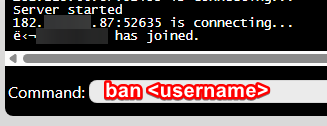
Alternatively, we can edit the banlist.txt directly in the Configuration Files tab.
You can do this while the server is running without having to turn it off or restart.
1. Open the Configuration Files tab.
2. Click the "Text Editor" button of the banlist.txt file.
Add the IP of the player you want to ban.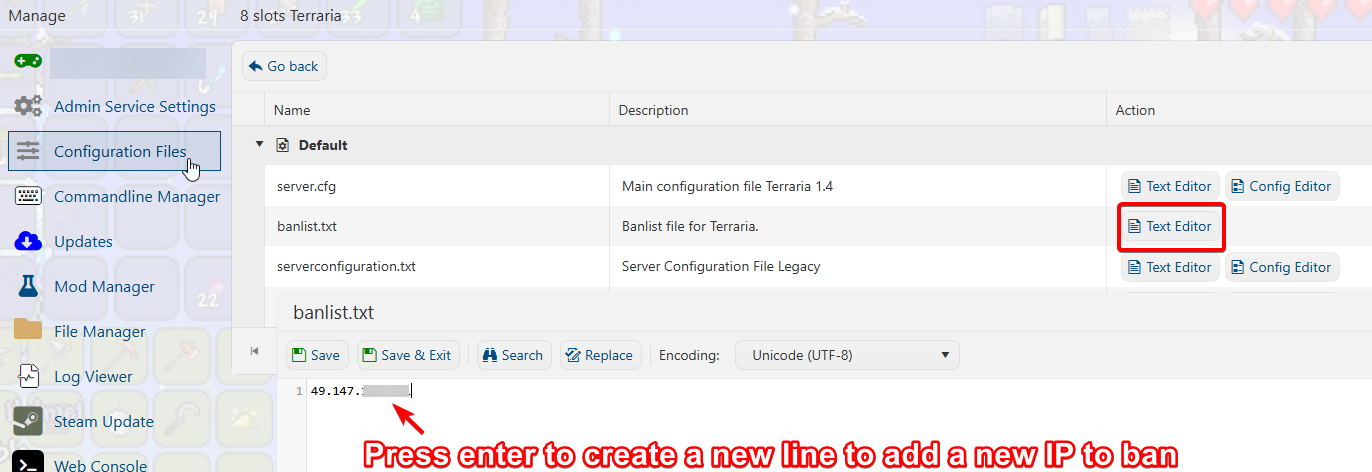
3. To get the IP of the player: Open the Web Console,
and it will show the IP of the player account when they joined.
Be sure only to add the main IP. Do not include the port, which are the numbers after " : ".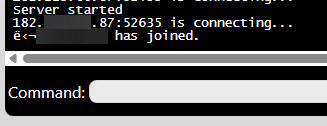
4. Once you are finished inputting the IP. Please hit "Save", and it should kick and ban the player.
To Unban players from the server, remove the banned IP from the banlist.txt file.
Did the above information not work for you?
Please click here to contact our support via a ticket.
