

This guide will show you how to manage Pal Spawn Rates on your Palworld Server
Not a client yet? Order a Palworld Server today with Citadel Servers
Managing the Pal Spawn Rate on your Palworld server allows you to control how frequently wild Pals appear throughout the game world. This setting can have a significant impact on exploration, resource gathering, combat, and overall progression, making it useful for tailoring your server's gameplay experience to your community's preferences. Increasing the Pal Spawn Rate causes more Pals to appear in the world at the same time, creating a more populated environment and giving players more opportunities to encounter, battle, and capture Pals. This can be particularly useful for servers focused on faster progression or communities that want a more active and populated world. Conversely, lowering the spawn rate reduces the number of Pals appearing, which can create a more challenging and less crowded experience. The Pal Spawn Rate is configured as a multiplier, allowing you to fine-tune the number of Pals that spawn without completely changing the game's default behavior. For example, increasing the multiplier above its default value will cause more Pals to spawn, while reducing it will decrease the number of Pals present in the world. In this guide, we'll walk you through how to locate the appropriate server configuration, adjust the Pal Spawn Rate to your preferred value, and properly apply the changes to your Palworld server. This allows you to customize the number of wild Pals available and create a gameplay experience that best suits your server and its players.
Customizing the Pal Spawn Rate
1. Log in to your Game Control Panel.
2. Before making any modifications, stop the server from running by clicking the Stop button.

3. Navigate to the Configuration Files section.

4. In Configuration Files, look for the Pal\Saved\Config\WindowsServer\PalWorldSettings.ini file and click the Text Editor beside the Config Editor.

5. In the Text Editor, locate the Pal Spawn Rate setting and enter your desired multiplier value. This value determines the number of Pals that can spawn in the world at a given time. Increasing the multiplier will increase the number of Pals that spawn, while decreasing it will reduce the number of Pals that spawn. For example, a value of 2.0 will double the default Pal spawn rate.
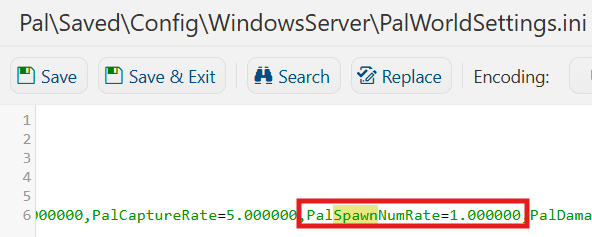
(Note: Setting the Pal Spawn Rate too high can significantly increase the number of Pals active in the world, which may impact server performance and stability. We recommend increasing the value gradually and monitoring your server's performance to find a suitable balance.)
6. After editing, click Save to apply the changes.

You can now start playing on your server.
Did the above information not work for you?
Please click here to contact our support via a ticket.
