

This guide will show you how to Adjust Hunger Settings on your Palworld Server
Not a client yet? Order a Palworld Server today with Citadel Servers
Managing hunger is an important part of maintaining the survival experience on your Palworld server. Hunger affects how often players need to consume food and can influence the overall pace and difficulty of gameplay. By adjusting the hunger settings, you can customize how quickly players become hungry and create a server experience that better matches your preferred playstyle. Whether you want to make survival more challenging by increasing the rate at which hunger decreases, or create a more relaxed experience by reducing the frequency of hunger, Palworld provides configuration options that allow you to fine-tune these mechanics. This can be particularly useful for servers focused on casual gameplay, PvE, PvP, or more challenging survival experiences. In this guide, we'll walk you through how to adjust the hunger settings on your Palworld server by modifying the appropriate server configuration file. You'll learn where to find the relevant setting, how to change its value, and how different values affect the hunger rate during gameplay. Before making any changes, we recommend creating a backup of your server configuration files. This allows you to restore your previous settings if you accidentally enter an incorrect value or decide to revert to your original configuration. After saving your changes, the server may need to be restarted for the new hunger settings to take effect.
Configuring Hunger Settings
1. Log in to your Game Control Panel.
2. Before making any modifications, stop the server from running by clicking the Stop button.

3. Navigate to the Configuration Files section.

4. In Configuration Files, look for the Pal\Saved\Config\WindowsServer\PalWorldSettings.ini file and click the Text Editor beside the Config Editor.

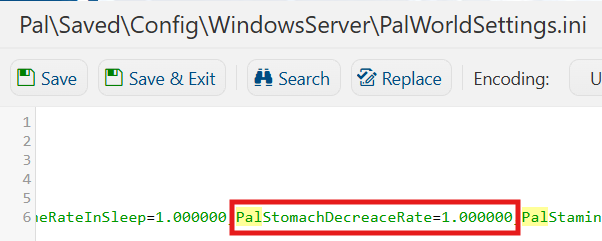
5. In the Text Editor, locate the Pal Hunger Depletion Rate setting and adjust its value according to your preferences. This setting determines how quickly Pals lose hunger over time.
Higher values will increase the rate at which Pals become hungry, while lower values will reduce their hunger depletion rate.
Locate the Player Hunger Depletion Rate setting and adjust its value according to your preferences. This setting determines how quickly players lose hunger over time. Higher values will cause players to become hungry more quickly, while lower values will slow down hunger depletion.
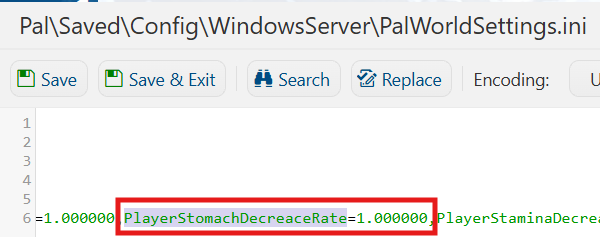
(Note: The values for these settings are multipliers, which determine the rate at which hunger depletes. For example, setting the value to 0.5 will cause hunger to decrease at half the normal rate, while a value of 2.0 will cause hunger to deplete twice as quickly.)
6. After editing, click Save to apply the changes.

You can now start playing on your server.
Did the above information not work for you?
Please click here to contact our support via a ticket.
