

This guide will show you how to enable or Disable Fast Travel on your Palworld Server
Not a client yet? Order a Palworld Server today with Citadel Servers
Fast Travel allows players to quickly move between discovered locations throughout the Palworld map, making it easier to explore, manage bases, and travel long distances without spending unnecessary time on the road. Depending on your server's preferred gameplay style, you may want to allow fast travel for a more convenient experience or disable it to encourage exploration and make progression more challenging. Palworld provides a server setting that allows you to control whether players can use Fast Travel. Disabling this feature can create a more immersive and survival-focused experience, while enabling it can make traveling between different areas more convenient for your community. This guide will walk you through how to enable or disable Fast Travel on your Palworld server by modifying the appropriate server setting. Once configured, players will follow the Fast Travel behavior you've selected when playing on your server.
Enabling Fast Travel Settings
1. Log in to your Game Control Panel.
2. Before making any modifications, stop the server from running by clicking the Stop button.

3. Navigate to the Configuration Files section.

4. In Configuration Files, look for the Pal\Saved\Config\WindowsServer\PalWorldSettings.ini file and click the Text Editor beside the Config Editor.

5. In the Text Editor, locate the Fast Travel setting and set its value to true to enable Fast Travel. To disable the feature, set the value to false.
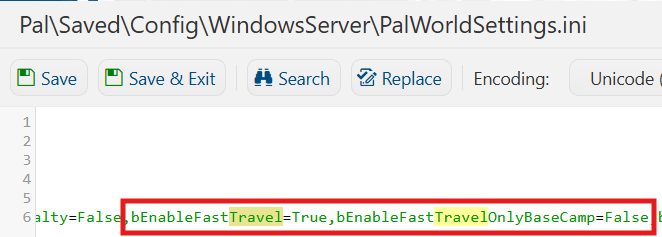
6. After editing, click Save to apply the changes.

You can now start playing on your server.
Did the above information not work for you?
Please click here to contact our support via a ticket.
