

This guide will show you how to configure the Experience Rate on your Palworld Server
Not a client yet? Order a Palworld Server today with Citadel Servers
Adjusting the Experience Rate on your Palworld server allows you to customize how quickly players gain experience and progress through the game. Increasing the experience rate can help players level up faster, making progression more suitable for shorter play sessions or larger communities. Alternatively, lowering the rate can provide a slower and more challenging progression experience for players who prefer a more traditional gameplay pace. Palworld provides server configuration options that allow you to modify the experience gain multiplier to suit your preferred gameplay style. Whether you want to speed up leveling, slow down progression, or create a balanced experience for your community, changing the experience rate is a simple way to customize your server. This guide will walk you through how to locate and configure the experience rate setting on your Palworld server, as well as how to apply the changes so they take effect in-game.
Adjusting XP Rate
1. Log in to your Game Control Panel.
2. Before making any modifications, stop the server from running by clicking the Stop button.

3. Navigate to the Configuration Files section.

4. In Configuration Files, look for the Pal\Saved\Config\WindowsServer\PalWorldSettings.ini file and click the Text Editor beside the Config Editor.

5. In the Text Editor, locate the XP Rate Multiplier field and enter your desired multiplier value. This value determines how much experience players and Pals gain compared to the default rate. For example, a multiplier of 2.0 grants twice the normal experience, while 0.5 reduces experience gain to half the normal rate. The setting applies to both Player XP and Pal XP.
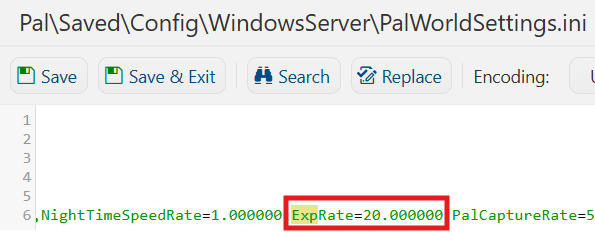
6. After editing, click Save to apply the changes.

You can now start playing on your server.
Did the above information not work for you?
Please click here to contact our support via a ticket.
