

This guide will show you how to manage the Dropped-Item Maximum Value on your Palworld Dedicated Server
Not a client yet? Order a Palworld Server today with Citadel Servers
Managing the dropped-item maximum value on your Palworld dedicated server allows you to control the number of items that can remain on the ground in your game world. Adjusting this setting can help customize your server's gameplay experience by determining how many dropped items can accumulate before the game removes excess items. This can be particularly useful for servers with many active players, as dropped items may accumulate quickly during exploration, resource gathering, and combat. Whether you want to allow more dropped items to remain in the world or reduce the limit to help manage item accumulation, modifying the appropriate server configuration can help you tailor the experience to your community's needs. In this guide, we'll walk you through how to access your Palworld dedicated server's configuration files and adjust the dropped-item maximum value to your preferred setting.
Adjusting Dropped-Item Cap
1. Log in to your Game Control Panel.
2. Before making any modifications, stop the server from running by clicking the Stop button.

3. Navigate to the Configuration Files section.

4. In Configuration Files, look for the Pal\Saved\Config\WindowsServer\PalWorldSettings.ini file and click the Text Editor beside the Config Editor.

5. In the Text Editor, locate the Max Dropped Items field, enter your desired value between 0 and 5000.
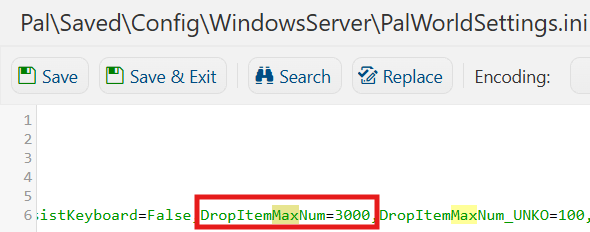
6. After editing, click Save to apply the changes.

You can now start playing on your server.
Did the above information not work for you?
Please click here to contact our support via a ticket.
