

This guide will show you how to Change Maximum Bases and Worker Pals on your Palworld Server
Not a client yet? Order a Palworld Server today with Citadel Servers
Managing base capacity and active worker limits is one of the most critical decisions for a Palworld server administrator. Whether you want to accommodate large guilds building vast industrial automation networks or cap worker counts to prevent server lag and frame drops, modifying base and worker limits directly shapes your server’s economy, progression pace, and hardware resource utilization. By default, Palworld enforces conservative caps on both the maximum number of bases a guild can build and the total number of Pals assigned to work at a single base camp. Adjusting these boundaries allows server owners to tailor base-building freedom to match their hardware capabilities and community size. While increasing worker and base caps enables massive automation projects, it directly increases the computational load on your server's CPU and RAM. Each active worker Pal requires real-time pathfinding, task AI evaluation, physics calculations, and item transport logic. Setting worker caps too high on crowded dedicated servers can result in Pal pathfinding bugs, delayed AI responses, or server tick-rate drops. Adjustments are typically applied by modifying the PalWorldSettings.ini configuration file or entering custom parameter overrides in your hosting provider's management console.
Configuring Max Base Camps and Worker Pals
1. Log in to your Game Control Panel.
2. Before making any modifications, stop the server from running by clicking the Stop button.

3. Navigate to the Configuration Files section.

4. In Configuration Files, look for the Pal\Saved\Config\WindowsServer\PalWorldSettings.ini file and click the Text Editor beside the Config Editor.

5. In the Text Editor, look for the Maximum Base Camps field (BaseCampMaxNum), specify the maximum number of base camps permitted per guild. Upon reaching this threshold, players cannot place additional Palboxes. For Worker pals, look for the Max Pals per Camp section, enter the number of Pals allowed to work at a single base. While this number is still restricted by the level of the base, the server-wide cap can be increased up to 50.
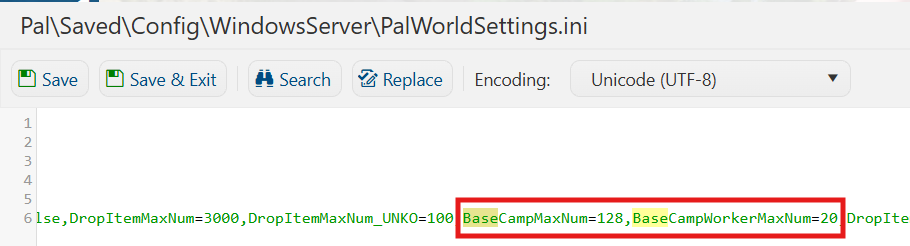
6. After editing, click Save to apply the changes.

You can now start playing on your server.
Did the above information not work for you?
Please click here to contact our support via a ticket.
