

This guide will show you how to enable, Disable, or adjust Aim Assist on your Palworld Server
Not a client yet? Order a Palworld Server today with Citadel Servers
Fine-tuning combat accessibility and aiming mechanics is essential for managing competitive balance and combat feel on a Palworld server. Whether you are hosting a cross-platform community with controller users, setting up a competitive PvP arena requiring manual precision, or simply adjusting target tracking for casual PvE play, configuring server-wide aim assist parameters gives you complete authority over targeting behavior. In Palworld, aim assist dictates how much automated target magnetism, lock-on assistance, and reticle slowdown controller and keyboard players receive during ranged combat and Pal capture sequences. Whether you want to disable aim assist completely for a hardcore tactical survival environment or enable full lock-on tracking to support gamepad users, proper configuration requires updating the server configuration file or modifying parameters directly through your hosting panel.
Configuring Aim Assist Settings
1. Log in to your Game Control Panel.
2. Before making any modifications, stop the server from running by clicking the Stop button.

3. Navigate to the Configuration Files section.

4. In Configuration Files, look for the Pal\Saved\Config\WindowsServer\PalWorldSettings.ini file and click the Text Editor beside the Config Editor.

5. Set the bEnableAimAssistPad and bEnableAimAssistKeyboard flags to True or False to enable/disable target magnetism for controller and keyboard users.
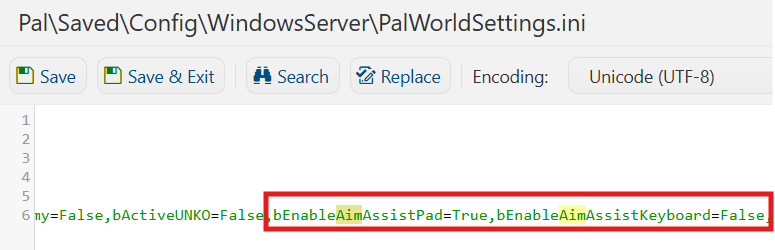
6. After editing, click Save to apply the changes.

You can now start playing on your server.
Did the above information not work for you?
Please click here to contact our support via a ticket.
