This guide will show you how to Disable Horde and Bandit Events on your HumanitZ Server
Order a HumanitZ Server today with Citadel Servers
Horde and bandit events in HumanitZ can add an extra layer of danger and unpredictability to the survival experience. While these events can create exciting encounters and challenges for players, they may not be suitable for every server. Server administrators who prefer a more relaxed, controlled, or customized gameplay experience may want to disable these events entirely. Disabling horde and bandit events can be useful for servers that focus on exploration, base building, resource gathering, or cooperative survival without frequent interruptions from large-scale enemy encounters. It can also help server owners tailor the overall difficulty and pacing of their gameplay environment to better match the preferences of their community. In this guide, we’ll show you how to disable horde and bandit events on your HumanitZ server. We’ll explain which server configuration setting controls these events and how to modify it correctly. Once the appropriate setting has been changed, the server will no longer trigger the corresponding horde and bandit events, giving you greater control over your server’s gameplay experience.
Turning off Horde and Bandit Events on Your HumanitZ Server
1. Log in to your Game Control Panel and navigate to your service.
2. Before making any changes, ensure that your server is fully stopped.
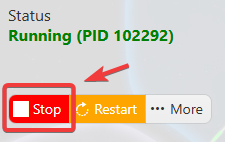
This helps prevent configuration changes from being overwritten or reverted to their default values.
3. Navigate to the Configuration Files tab to access your server’s configuration settings.
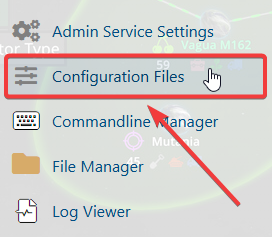
4. In the Configuration Files section, locate the gameserversettings.ini file, then click Text Editor next to it to open the configuration settings.

5. Locate the AI Event parameter and set its value to 0 to disable the food decay settings.
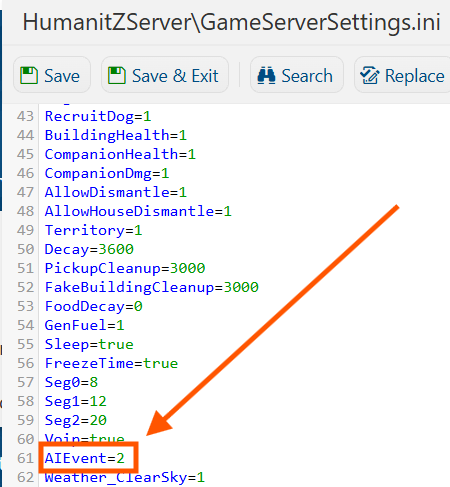
You can adjust the AI Event value to control how often horde and bandit events occur on your server.
| Values | Description |
| 0 | Disabled: Random AI horde and bandit events will no longer occur. |
| 1 | Low: Random AI horde and bandit events will occur at a low frequency. |
| 2 | Default: Random AI horde and bandit events will occur at a normal frequency. |
| 3 | High: Random AI horde and bandit events will occur at a high frequency. |
| 4 | Insane: Random AI horde and bandit events will occur at the highest frequency. |
6. Once you have finished editing the settings, click the Save button to apply the changes to your server.