
This guide will show you how to Disable Food Decay on your HumanitZ Server
Order a HumanitZ Server today with Citadel Servers
Managing food and resources is an important part of survival in HumanitZ. By default, food can gradually decay over time, requiring players to regularly monitor their supplies and consume or replace items before they become unusable. While this mechanic adds a layer of realism and survival difficulty, server administrators may prefer to disable it for a more relaxed or customized gameplay experience. Disabling food decay can be particularly useful for servers that focus on exploration, base building, cooperative gameplay, or long-term survival. It allows players to store food without worrying about it spoiling while they are away from their base or focused on other activities. This can also make resource management more convenient for communities that want to reduce some of the game's survival mechanics. In this guide, we’ll walk you through the steps required to disable food decay on your HumanitZ server. We’ll cover where to locate the appropriate server configuration parameter and how to modify its value so that food no longer decays. With the setting properly configured, you can customize your server’s survival experience to better suit your community’s preferred playstyle.
Removing Food Decay on Your HumanitZ Server
1. Log in to your Game Control Panel and navigate to your service.
2. Before making any changes, ensure that your server is fully stopped.
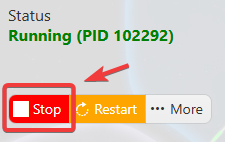
This helps prevent configuration changes from being overwritten or reverted to their default values.
3. Navigate to the Configuration Files tab to access your server’s configuration settings.
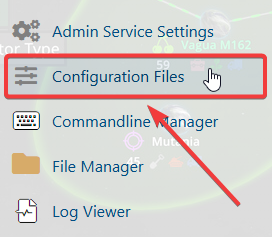
4. In the Configuration Files section, locate the gameserversettings.ini file, then click Text Editor next to it to open the configuration settings.

5. Locate the Food Decay parameter and set its value to 0 to disable the food decay settings.
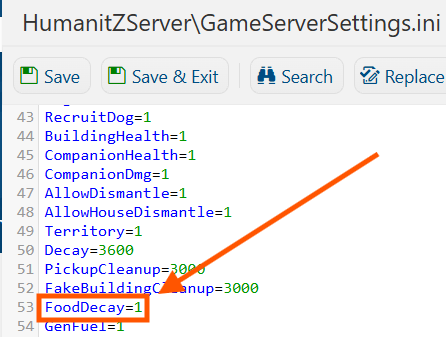
You can adjust the Food Decay value to control how quickly food spoils on your server.
| Values | Description |
| 0 | Disables food decay, preventing food items from spoiling over time. |
| 0.5 | Food will decay at half the normal rate, allowing it to remain fresh for twice as long. |
| 1 | Food will decay at the normal rate. |
| 2 or higher | Setting the value to 2 or higher will cause food to decay faster than the normal rate. |
6. Once you have finished editing the settings, click the Save button to apply the changes to your server.