

This guide will show you how to adjust the day length on your V Rising server
1. Log in to your Citadel Servers Game Panel and stop your server.
2. Navigate to the Configuration Files tab, then open the ServerGameSettings file using the text editor.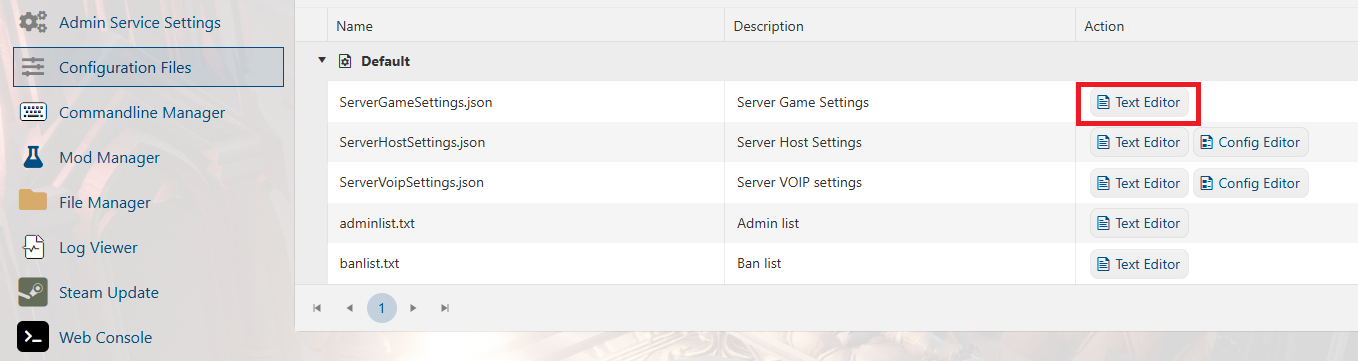
3. Locate the following settings and adjust them to your preferred values: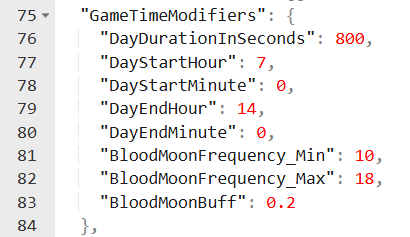
| Value | Effect |
|---|---|
| 600 | 10-minute cycle |
| 1080 | 18-minute cycle (Default) |
| 1800 | 30-minute cycle |
| 3600 | 60-minute cycle |
4. Click Save, then start your server and join to verify that the changes have been applied.
For further server configuration settings, you can view the full guide here: Server Configuration for your V Rising Server.
Did the above information not work for you?
Please click here to contact our support via a ticket.
