
 EUR
EUR GBP
GBP USD
USDBannerlord Coop Mod Game Hosting
What is Bannerlord Coop Mod
Bannerlord COOP is a cooperative multiplayer mod for Mount & Blade II: Bannerlord that turns the single player Calradia campaign into a shared world you can play with friends. By default Bannerlord only offers competitive multiplayer modes such as Siege, Skirmish and Captain, with no way to play the campaign together. The Bannerlord COOP mod adds that missing campaign co-op layer, synchronising the world map, parties, clans, settlements and battles between every connected player.
Getting started with Bannerlord COOP
To play the Bannerlord COOP mod you need a copy of Mount & Blade II: Bannerlord which can be bought on steam or a key website, once you have that you can download the mod from the Steam Workshop, Nexus Mods or our website. There is a client and a dedicated server version of this mod. Every player in your co-op campaign must be running the same Bannerlord game version and the same Bannerlord COOP mod version, otherwise you will not be able to connect.Installing Bannerlord COOP Mod
Note: Currently only the steam version works with this mod Server Version/Files If you have a Mount & Blade II: Bannerlord Game server with us, we provide this as a one click install for Bannerlord COOP that you can find in the game panel, we also provide many additional mods. Simply clicking Uninstall/Install will retrieve the latest version of this in our game panel. Running the mod on a dedicated server is strongly recommended over peer to peer hosting, as the host player's PC no longer has to simulate the campaign for everyone else, which removes most of the desync and lag spikes people run into when self hosting.Client Files for Bannerlord COOP
Client Files for the modThe easiest way to install the client is through the Steam Workshop. Find Bannerlord COOP in the Bannerlord Workshop and hit Subscribe, Steam will then download and update the mod for you automatically. You can also grab it manually from the Nexus Mods page if you prefer to control which version you are on.
For a manual install you need to locate your files in your steam directory for Bannerlord, Usually this is located in C:\Program Files (x86)\Steam\steamapps\common\Mount & Blade II Bannerlord but this location can change based on your Bannerlord installation.
You can also do this via the Steam application. Find Mount & Blade II: Bannerlord in your steam library, right click it and open the Properties window. Navigate to the 'Installed Files' tab and click 'Browse'
Right click the downloaded .zip file you downloaded and check it's not blocked by clicking Properties. Make sure to hit unblock if it says so at the bottom. If this does not appear, close the window.
Extract the contents of the .zip to where you download it. You can use applications such as Winrar or 7zip to do this, Windows 10 and 11 should also be able to do this by itself.
Now copy the extracted mod folder into the Modules folder inside your Bannerlord directory. Make sure to let it overwrite files when it asks.
Launch the game, and in the Bannerlord launcher tick Bannerlord COOP in the Singleplayer mods list. Move it to the bottom of the load order and untick every other mod, then press Play.
Joining a Bannerlord COOP Server
Once the mod is enabled in the launcher you will see a co-op option on the main menu. Enter the IP address and port of the server you want to join, along with the password if the host has set one. If you rent a Bannerlord COOP server from us, the connection details are shown at the top of your game panel and can be shared with your friends directly. The host or server holds the campaign save, so progress carries over between sessions and players can drop in and out without losing their character, clan or fiefs.Bannerlord COOP Features
- A shared, persistent campaign map where every player moves their own party in real time
- Independent characters, clans, companions and kingdoms for each player
- Synchronised AI lords, parties, armies and world events
- Recruitment, troop upgrades, party management and army creation
- Trading, caravans, workshops, smithing and settlement management
- Field battles, sieges and raids that players can join together
- Both PvE against the AI factions and optional PvP between players
- Players visible to each other inside scenes such as towns, taverns and villages
- Dedicated server support for stable, always available co-op campaigns
Bannerlord COOP Requirements
Before you start your co-op campaign
The mod is currently optimised for campaigns of up to 8 players. Larger groups can work but stability drops as player numbers climb. Every player must run the same Bannerlord version and the same mod version. A clean Bannerlord installation is recommended, disable all other mods before starting a co-op campaign as third party mods are a common cause of crashes and desyncs. The War Sails DLC is not currently supported and should be disabled. Only the Steam version of the game is supported.
Bannerlord COOP Description
Bannerlord COOP is a community made modification for Mount & Blade II: Bannerlord that provides a client server framework for running the sandbox campaign as a multiplayer game. Rather than rewriting Bannerlord, the mod hooks into the existing campaign systems and keeps the world state in sync across every connected client, so parties, time, settlements, battles and clan data all stay consistent. This means you and your friends can each start your own clan, rise through the ranks of a kingdom, fight in the same battles and carve up Calradia together, while keeping the gameplay loop that the base game is known for. The mod is developed and maintained for free by the volunteer Bannerlord Coop Team, who provide support, setup documentation and bug reporting through their Discord community. As with any campaign scale multiplayer project, bugs, crashes and incomplete mechanics should be expected while development continues, so it is worth keeping your mod version up to date and backing up your co-op saves. Read MoreGetting started with Bannerlord COOP
To play the Bannerlord COOP mod you need a copy of Mount & Blade II: Bannerlord which can be bought on steam or a key website, once you have that you can download the mod from the Steam Workshop, Nexus Mods or our website. There is a client and a dedicated server version of this mod. Every player in your co-op campaign must be running the same Bannerlord game version and the same Bannerlord COOP mod version, otherwise you will not be able to connect.Installing Bannerlord COOP Mod
Note: Currently only the steam version works with this mod Server Version/Files If you have a Mount & Blade II: Bannerlord Game server with us, we provide this as a one click install for Bannerlord COOP that you can find in the game panel, we also provide many additional mods. Simply clicking Uninstall/Install will retrieve the latest version of this in our game panel. Running the mod on a dedicated server is strongly recommended over peer to peer hosting, as the host player's PC no longer has to simulate the campaign for everyone else, which removes most of the desync and lag spikes people run into when self hosting.Client Files for Bannerlord COOP
Client Files for the modThe easiest way to install the client is through the Steam Workshop. Find Bannerlord COOP in the Bannerlord Workshop and hit Subscribe, Steam will then download and update the mod for you automatically. You can also grab it manually from the Nexus Mods page if you prefer to control which version you are on.
For a manual install you need to locate your files in your steam directory for Bannerlord, Usually this is located in C:\Program Files (x86)\Steam\steamapps\common\Mount & Blade II Bannerlord but this location can change based on your Bannerlord installation.
You can also do this via the Steam application. Find Mount & Blade II: Bannerlord in your steam library, right click it and open the Properties window. Navigate to the 'Installed Files' tab and click 'Browse'
Right click the downloaded .zip file you downloaded and check it's not blocked by clicking Properties. Make sure to hit unblock if it says so at the bottom. If this does not appear, close the window.
Extract the contents of the .zip to where you download it. You can use applications such as Winrar or 7zip to do this, Windows 10 and 11 should also be able to do this by itself.
Now copy the extracted mod folder into the Modules folder inside your Bannerlord directory. Make sure to let it overwrite files when it asks.
Launch the game, and in the Bannerlord launcher tick Bannerlord COOP in the Singleplayer mods list. Move it to the bottom of the load order and untick every other mod, then press Play.
Joining a Bannerlord COOP Server
Once the mod is enabled in the launcher you will see a co-op option on the main menu. Enter the IP address and port of the server you want to join, along with the password if the host has set one. If you rent a Bannerlord COOP server from us, the connection details are shown at the top of your game panel and can be shared with your friends directly. The host or server holds the campaign save, so progress carries over between sessions and players can drop in and out without losing their character, clan or fiefs.Bannerlord COOP Features
- A shared, persistent campaign map where every player moves their own party in real time
- Independent characters, clans, companions and kingdoms for each player
- Synchronised AI lords, parties, armies and world events
- Recruitment, troop upgrades, party management and army creation
- Trading, caravans, workshops, smithing and settlement management
- Field battles, sieges and raids that players can join together
- Both PvE against the AI factions and optional PvP between players
- Players visible to each other inside scenes such as towns, taverns and villages
- Dedicated server support for stable, always available co-op campaigns
Bannerlord COOP Requirements
Before you start your co-op campaign
The mod is currently optimised for campaigns of up to 8 players. Larger groups can work but stability drops as player numbers climb. Every player must run the same Bannerlord version and the same mod version. A clean Bannerlord installation is recommended, disable all other mods before starting a co-op campaign as third party mods are a common cause of crashes and desyncs. The War Sails DLC is not currently supported and should be disabled. Only the Steam version of the game is supported.
Bannerlord COOP Description
Bannerlord COOP is a community made modification for Mount & Blade II: Bannerlord that provides a client server framework for running the sandbox campaign as a multiplayer game. Rather than rewriting Bannerlord, the mod hooks into the existing campaign systems and keeps the world state in sync across every connected client, so parties, time, settlements, battles and clan data all stay consistent. This means you and your friends can each start your own clan, rise through the ranks of a kingdom, fight in the same battles and carve up Calradia together, while keeping the gameplay loop that the base game is known for. The mod is developed and maintained for free by the volunteer Bannerlord Coop Team, who provide support, setup documentation and bug reporting through their Discord community. As with any campaign scale multiplayer project, bugs, crashes and incomplete mechanics should be expected while development continues, so it is worth keeping your mod version up to date and backing up your co-op saves.Bannerlord Coop Mod
All our Game Server Services come with the features you need
Check out all of the essential game server features that come with your server rental
Access to our Game Server Management Panel
Our full featured, game control panel allows you to configure and customize your game servers. Install supported mods / maps, switch locations, and change any setting with one click.
Full Control
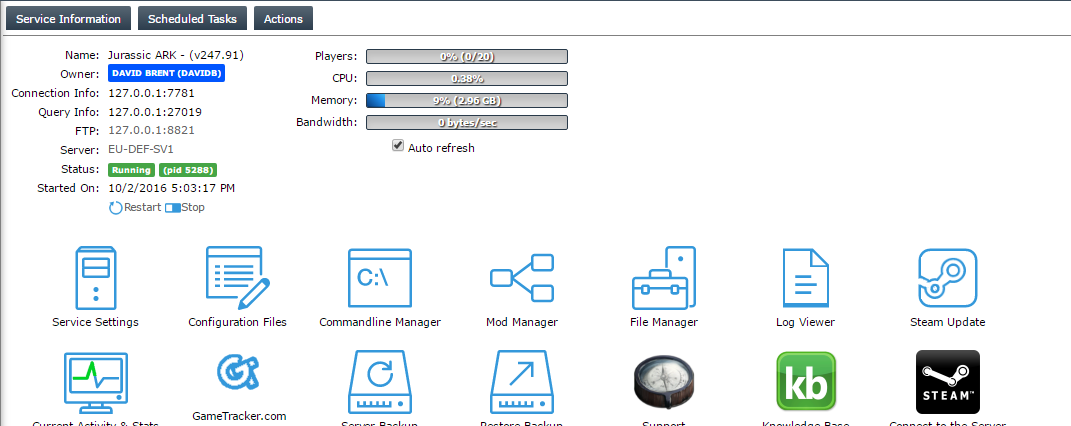
Start, Stop, Reinstall, you have full control over your server with one click. You can schedule tasks to run scripts, backups and more!
Server Configuration
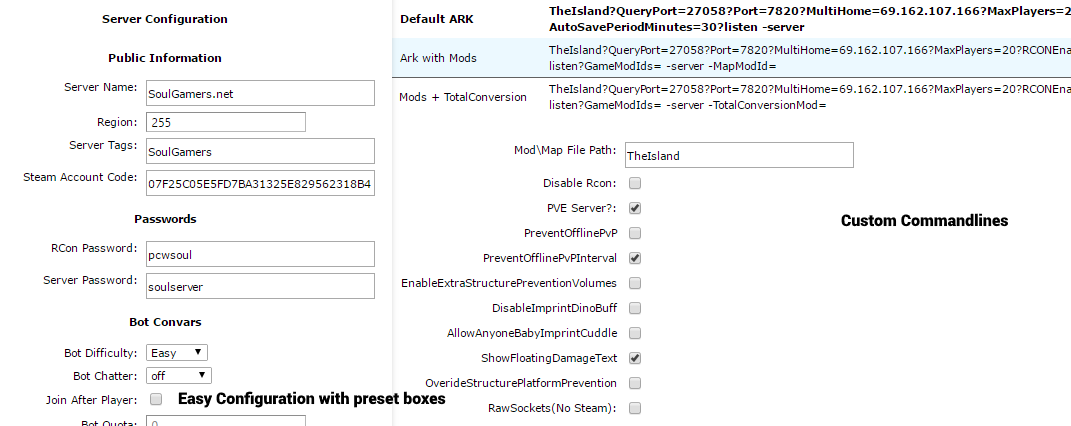
Edit your server's configuration with the click of the button, change the Server name, password, Game settings, set admin permissions or view server logs, your in control.
Server Backups
Backup and deploy it to your server from a click of the button, never worry about loss of server data again, these can be scheduled too!
One Click Mods
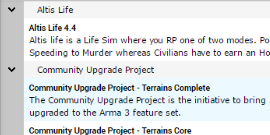
One click install mods to your servers, no need to configure a database or script again, simply click and play.
Worldwide Coverage
Citadel Servers offers Network coverage worldwide, providing the very best network coverage in over 18 locations, Connect to your players all around the world, with a low latency infrastructure solution no matter where you or your players may be!
Deploy your Bannerlord Coop Mod game server
Click here to configure your server and have it deployed and live in minutes!